

Most teams don’t have a monitoring problem. They have a reporting expectation problem.
If alerts arrive but no one can act during transit, they become noise. If the only information shows up at delivery, it may not be enough to resolve disputes or improve packaging or shipping logistics.
The question is not how much monitoring you can deploy. It is how much reporting your operation can actually use.
Start with the real question: when can your team act
Shipment reporting only creates value when it aligns with a real response window.
In practice, every lane falls into one of four moments:
During transit, when someone can contact a carrier or forwarder and request a hold, inspection or controlled handling
At a hand-off, such as a hub, airport or consolidation point
At receiving, where teams decide accept, inspect or quarantine
After delivery, when the focus shifts to investigation, claims and packaging improvement
This is where most misalignment happens. Teams invest in faster reporting than they can act on, or receive information too late to support decisions.
A quick reality check makes this visible:
- Who is reachable during transit
- What actions are actually feasible
- If no action is possible, faster reporting does not improve outcomes
The reporting decisions to define first
Before selecting a device, define how decisions are made.
Who acts on shipment events
Operations, receiving, quality or a shared exception function. If ownership is unclear, response becomes inconsistent
What decision is being made
Accept, inspect, quarantine, escalate, investigate or redesign packaging
How much evidence is required
Some workflows need only a clear signal at receiving. Others require a detailed record to support investigation and continuous improvement
This is the difference between monitoring for control and monitoring for documentation.

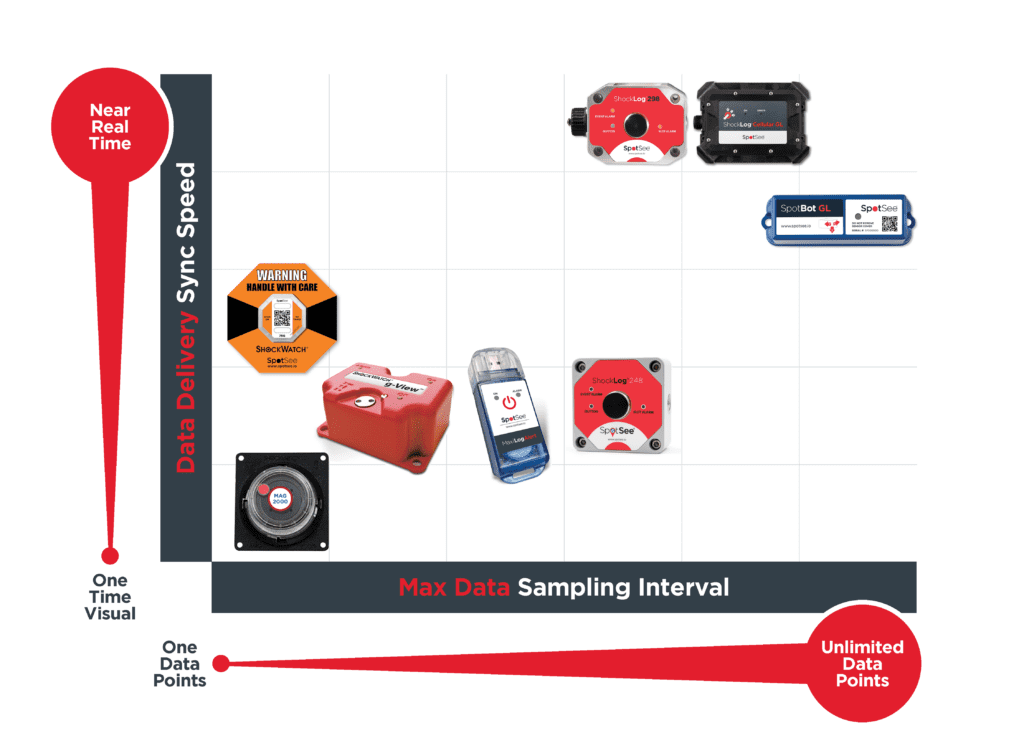
The reporting spectrum: speed and depth
Shipment reporting is best understood through two variables. How fast the information arrives, and how much detail it contains.
Visual or scan-based signals/single data point
This is the fastest form of reporting and the closest to the decision moment.
Devices such as ShockWatch 2 QR, ShockWatch Label QR and MAG 2000 provide a clear, visible signal that supports immediate action at receiving. A receiver can apply a consistent rule: good read, accept. Bad read, inspect, document and escalate.
QR-enabled options like ShockWatch 2 QR and ShockWatch Label QR extend this by linking the observation to a time-stamped, shipment-specific record. This turns a visual check into retrievable evidence without adding complexity at the dock.
The role of this level is not to explain what happened during transit. It is to make the receiving decision consistent and documentable.
Download-based recorders/multiple data points
This level provides more depth, but the information arrives after delivery.
Devices such as gView, MaxiLog and ShockLog 248 capture detailed trip data, including impact, temperature or environmental conditions depending on configuration. The value appears during investigation, packaging validation and dispute resolution.
At receiving, teams still make a disposition decision. The difference is that the full record becomes available later, allowing engineering and quality teams to reconstruct events and identify root causes.
This level is most useful when the goal is to improve packaging performance or support claims with detailed evidence.
Connected monitoring with variable multiple data points
This level combines speed and depth. Information is available during transit and shared across teams.
ShockLog Cellular GL paired with ShockLog 298 adds connectivity to detailed event recording, enabling alerts and location context while the shipment is moving when network conditions allow.
SpotBot GL provides connected, multi-condition monitoring with shared access through SpotSee Cloud, allowing multiple stakeholders to view shipment conditions, track location and respond to events in near real time.
This level creates value when there is a defined response, and live tracking is needed. If someone can act during transit or coordinate across teams, connected monitoring supports earlier intervention and more consistent escalation.
Matching reporting to operational outcomes
Each reporting level supports a different type of decision.
Visual and scan-based signals support fast, consistent accept, inspect or quarantine decisions at receiving
Download-based recorders support investigation, packaging improvement and dispute resolution after delivery
Connected monitoring supports earlier awareness and coordinated response when teams can act before delivery
The key is alignment. Reporting should match the moment where your team can actually influence the outcome.
A simple use case: right-sized reporting in practice
Consider a high-value shipment moving between sites.
If the primary need is a clear receiving decision, a visual or scan-based approach provides the fastest and most consistent outcome.
If the team regularly investigates damage or needs to correlate events to failures, a download-based recorder provides the required detail.
If a team is staffed to monitor shipments during transit and act on alerts, connected monitoring becomes relevant because it supports real intervention.
The shipment does not change. The response capability does.
A 60-second device selection guide
Need a fast, single data point accept or inspect decision at receiving
ShockWatch 2 QR, ShockWatch Label QR, MAG 2000
Need simple scan-based documentation tied to a specific shipment
ShockWatch 2 QR or ShockWatch Label QR
Need detailed trip data after delivery for investigation
gView, MaxiLog, ShockLog 248
Need alerts during transit, multiple data points or shared cloud visibility across teams
ShockLog Cellular GL with ShockLog 298, or SpotBot GL
Who this framework helps inside the organization
Engineering and quality teams gain access to the level of detail required for investigation and improvement
Logistics and operations teams align alerts with real response windows instead of reacting to noise
Procurement and finance teams avoid paying for reporting capabilities that are not operationally used
Conclusion
Shipment monitoring works best when reporting matches the moment you can act.
Define the response window first. Then select the reporting speed and data depth that support the decisions your team actually makes.
More reporting is not better if it arrives too early, too late or to the wrong owner.
—
You might also like:


