

Tilt evidence only helps at receiving when it is consistent, time-stamped, and reviewable across hand-offs. TiltWatch® XTR QR adds QR-enabled traceability to a single-use tilt indicator so teams can make clearer good read or bad read decisions and document what happened, when it was observed, and where it was scanned.
Why a red indicator is not enough at a hand-off
In supply chain logistics, a receiving decision often happens in minutes. A shipment arrives at a dock, it is moved into a controlled area, and receiving teams must decide whether to accept, hold, inspect, or escalate, without slowing throughput or breaking SOP discipline.
A visual red indicator can signal that tipping occurred, but it does not standardize what happens next. Different shifts may interpret the same condition differently. Partners may document it inconsistently. As a result, investigations can turn into debates about timing and custody rather than focusing on containment and corrective action.
A visual indicator answers “something happened.” It does not answer “when did we observe it, where, and what did we do next.”
This is why digital traceability matters. When the hand-off includes a scan, the decision moment becomes repeatable. The record becomes usable for review, training, and continuous improvement.
What TiltWatch® XTR QR is
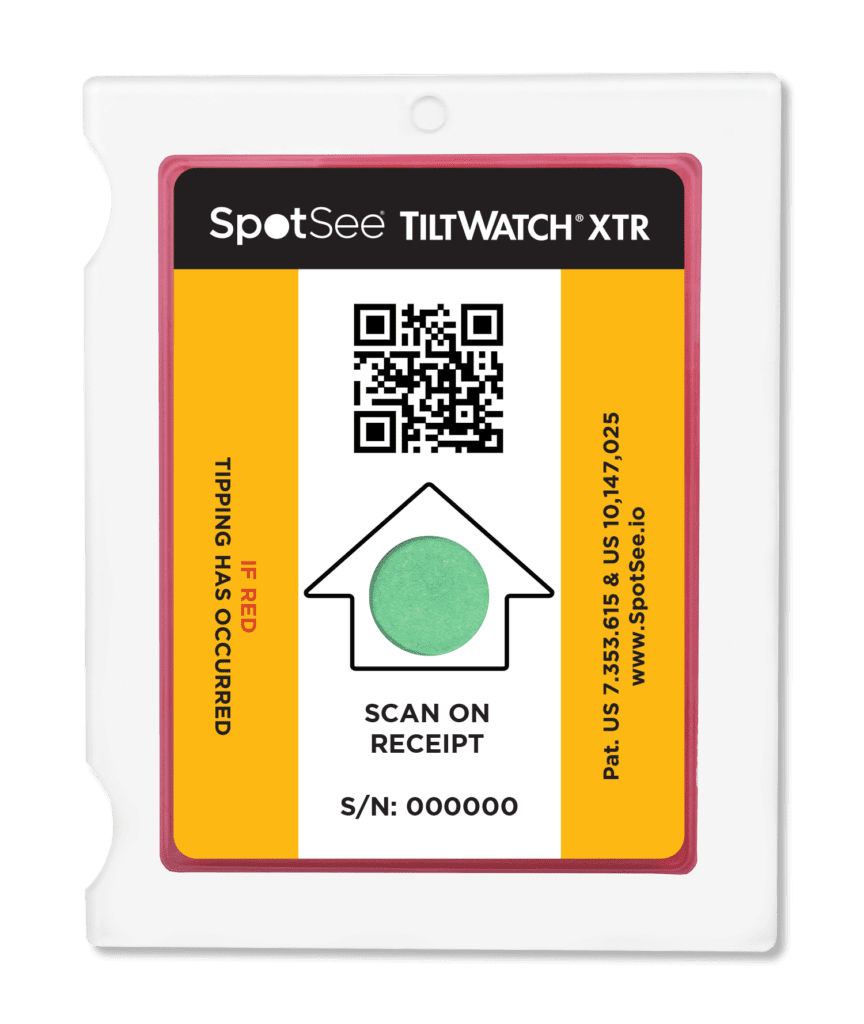
TiltWatch® XTR QR is a single-use tilt indicator designed for shipments that must remain upright.
It is a battery-less, connected indicator that uses a smartphone scan to report condition along with time, date, location, and serial number to the SpotSee Cloud.
It provides clear visual evidence when tipping is indicated, which can support consistent receiving decisions for delicate or high-value assets moving through supply chain operations.
The printed instruction on the indicator supports the workflow directly, it reads: “Scan upon receipt – if red tipping has occurred.” That instruction matters because it shifts the indicator from a passive check to an active step in the receiving process.
Each unit is uniquely serialized, which allows the indicator to be tied to a specific shipment, asset, or tracking record before it even leaves the origin.
TiltWatch® XTR QR is not positioned as a replacement for proper packaging and labeling. Instead, it complements existing controls by adding handling visibility that can be tied directly to operational hand-offs.
Operational hand-off clarity, what changes in practice
Hand-off clarity means that each custody change has a defined, repeatable action and a shared record. In practice, that clarity comes from two linked decisions.
First, the operator performs the same step at each defined point, scan the QR-enabled indicator at ship-out, arrival, receiving, or internal transfer, based on the organization’s SOP (Standard Operating Procedure). Second, the scan creates a consistent record that multiple authorized parties can reference later.
Because each scan captures condition, timestamp, location, and a visual image of what the receiver saw, the record reflects the exact decision moment, not a reconstruction.
Because of this, review discussions tend to shift from “when did it happen” to “what do we do next.” That is a meaningful change for quality teams managing deviations, for operations teams managing dock flow, and for compliance teams preparing for audits.
How the scan workflow works end-to-end
TiltWatch® XTR QR is supported by a cloud workflow intended to be straightforward for receiving teams and governable for administrators.
Account setup and permissions
Registration is performed using the QR code and registration code provided on the 100-pack box.
One person creates the organization account, then assigns users and permissions, ensuring all scans are captured within a single controlled environment.
This structure supports controlled access across sites and partner roles, which is often necessary for compliance, reporting, and in some instances, insurance purposes. .
Using the scan at defined decision points
The scan is most effective when it is built into existing receiving checkpoints. Teams typically define scan points at the same moments they already perform visual checks and documentation steps. In practice, that can include ship-out verification, receiving, and internal transfers between controlled areas.
When tipping is indicated, the scan result can be used alongside the organization’s SOP decision tree.
In the system, each scan updates shipment condition status, for example “no tilt event” or “tilt event detected,” which standardizes how results are interpreted across sites.
This supports consistent actions such as:
- accept with inspection
- hold for quality review
- or escalate to an exception workflow
The indicator does not determine disposition on its own, but it can make the triggering evidence more consistent.
What gets recorded and why it helps reviews
The SpotSee Cloud presents scan events in a way that is reviewable and actionable.
Each scan can include:
- Indicator condition (tilt event or no event)
- Timestamp of the scan
- Location based on the scanning device
- Image of the indicator at the time of scan
It also maintains scan history across hand-offs and supports exports for reporting and internal review.
Administrative features such as user management and audit logs help ensure the record is governed, traceable, and review-ready.
A practical supply chain use case at receiving (hypothetical)
Consider a hospital receiving an MRI system, a high-value asset where internal alignment and calibration can be affected by tipping during transport.
The shipment arrives at receiving. The team performs standard checks: packaging condition, shipment verification, and documentation.
As part of the same step, they scan the TiltWatch® XTR QR indicator.
If tipping is indicated:
- The scan captures a time-stamped, location-based record tied to that specific unit
- The system flags a tilt event at receipt
- The team follows SOP: hold the unit and escalate
Instead of moving directly to installation, the MRI is held for inspection and calibration verification before use.
Because the evidence is captured at the decision moment, the team does not rely on:
- Informal photos
- Verbal reports
- Email follow-ups
The result is a cleaner, faster path to the right action: verify, correct, and only then proceed.
How to roll out without disrupting receiving throughput
A pilot is typically most stable when it starts narrow. Selecting one lane, one site, or one high-risk asset category keeps training focused and makes it easier to evaluate whether scan compliance is achievable at the chosen hand-offs.
Because receiving teams operate under time pressure, rollout should emphasize decision discipline, not additional steps.
The goal is not more data. It is consistent, repeatable decisions supported by a standard scan action.
This usually means:
- Defining scan points in the SOP
- Training for good read or bad read actions
- Clarifying what documentation is required when tipping is indicated
- Defining where scan records live and who can access them
Partner alignment can then follow.
Be explicit about:
- Who scans
- Who reviews
- Who exports records
Serialization and documentation tie-in
Each unit is uniquely serialized, which supports linking the indicator to shipping documentation. Shippers can scan to capture the serial number and associate it with internal paperwork or software workflows.
This creates continuity between ship-out, transit, and receiving, ensuring that the same unit is referenced across all hand-offs.
This should be positioned as support for linkage rather than a guaranteed integration, since integrations vary by system and process.
Conclusion
TiltWatch® XTR QR is designed for the decision moments that define supply chain operations, especially at receiving and transfer points where handling evidence either becomes clear or gets lost.
A tilt indicator shows that something happened. A scanned indicator shows when, where, and on which unit it was observed.
When the hand-off includes a scan, tilt evidence becomes a record that teams can actually use.
—
You might also like: